Summary
This article explains credentialing, enrollment, how to choose plans in the Zaya Portal, and when you can begin billing in-network.
Quick definitions
Credentialing (insurance-agnostic): Verifying your providers' qualifications and practice details so they can participate with insurance carriers.
Enrollment (insurance-specific): Linking an eligible, credentialed provider to a specific plan so claims can be billed in-network.
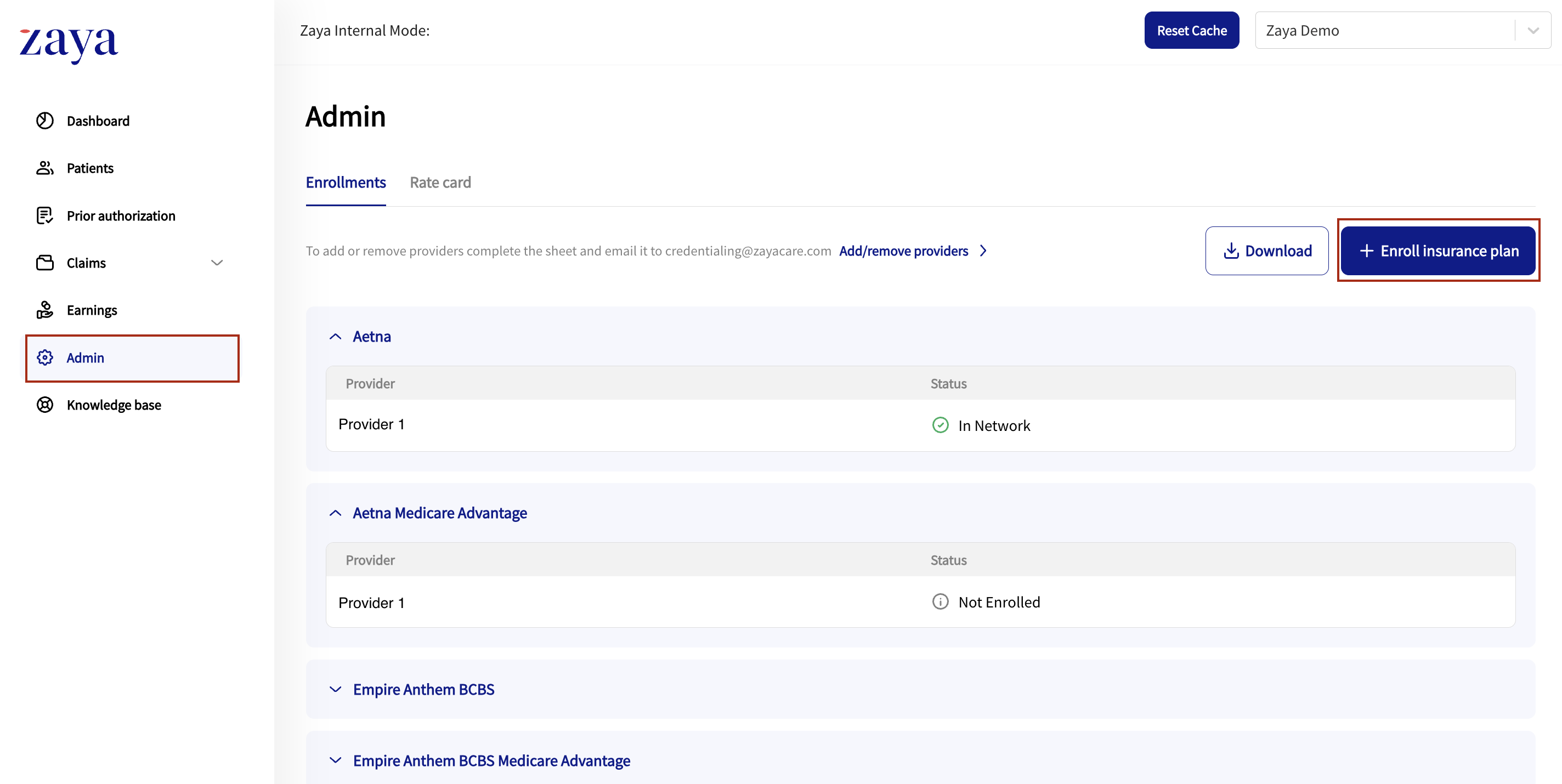
How to view which plans your practice is enrolled with:
Log in to the Zaya Portal
Go to Admin on the left panel.
Click into the different payer names to see which plans your practice is enrolled with, and which providers are In-Network
How do I change enrollment preferences?
Log in to the Zaya Portal
Go to Admin on the left panel.
Click '+ Enroll insurance plan' which will take you to a form to submit to select all plans you would like to enroll with
Submitting this form replaces your previous preferences. If you remove a plan you were enrolled in, Zaya will send a termination notice to that insurance for your providers.
Processing timeline
Zaya is a delegated entity with most insurance plans. Plans authorize Zaya to perform credentialing and process enrollments on their behalf under agreed standards. This allows faster processing than typical carrier-direct timelines.
Zaya’s role: Submit updates promptly once your form is received.
Your role: Respond quickly to any documentation requests or required actions from the credentialing team.
Insurance directories are controlled by insurance plans. Public listings may take up to ~3 months to reflect changes, even when enrollment is already active or a provider termination has been submitted.
Active enrollments (when you can bill)
In the Zaya Portal, go to the Admin section. Each insurance is listed next to the provider with the In-Network status. This status updates live. You can bill in-network once the status shows In-network and the effective date has been reached.
What does the enrollment status mean?
Not Enrolled – your practice is not enrolled with this insurance
Pending – The enrollment for this provider is in progress with the insurance
In-network – The provider is enrolled and able to submit claims.
Terminated – Provider removed from enrollments at your request.
Was this article helpful?
That’s Great!
Thank you for your feedback
Sorry! We couldn't be helpful
Thank you for your feedback
Feedback sent
We appreciate your effort and will try to fix the article