Summary
To bill Medicare Advantage claims through Zaya, providers must be enrolled under Zaya’s Medicare group application. This allows Zaya to obtain a unique PTAN for each provider. This enrollment does not impact other Medicare enrollments (e.g., under your own Tax ID) and does not require you to submit Traditional Medicare claims through Zaya. Providers can be linked to multiple groups at the same time without affecting existing affiliations.
Providers who have never been enrolled with Medicare under any Tax ID must complete full Medicare enrollment and grant surrogacy access to the Zaya Credentialing Team.
Part 1: Granting Surrogacy Access (Required for New Medicare Enrollments)
If you are not enrolled in Medicare in your state, Zaya must be granted access to prepare and submit your enrollment application.
- Visit: https://nppes.cms.hhs.gov/IAWeb/warning.do
- Click Accept and log in using your PECOS credentials.
- Complete multi-factor authentication.
- Click the My Staff tab.
- Select Add Staff.
- Enter:
- Name: Leoni Runge
- Email: credentialing@zayacare.com
- Role: User Access (select PECOS)
Submit your request.
The Zaya Credentialing Team will finalize the connection once received.
Once surrogacy access is established, Zaya will prepare your Medicare enrollment application. You will be notified when your electronic signature is required.
Key information about PECOS and CMS systems
Every provider with an NPI has a PECOS account. Providers who believe they do not have one typically have not used it or their account was managed by staff without full CMS access.
You do not need your PECOS login credentials to complete the e-signature.
Linked CMS systems:
CMS Identity and Access Management (IAM): Primary login system
NPPES: Manages the NPI profile
PECOS: Manages Medicare enrollments
If login access is lost or controlled by another party, contact CMS at 1-866-484-8049 to regain control.
Part 2: Completing the Electronic Signature in PECOS
- Locate the CMS PIN email.
- Sent from customerservice-donotreply@cms.hhs.gov
- One email per provider
- Contains a unique 13-digit PIN
- Either:
- Forward the email to the provider so they can sign, or
- If authorized, use the PIN in the PECOS E-Signature portal
PINs expire 14 days after submission. If a PIN expires, contact the Zaya Credentialing Team to retrigger the request.
- In the CMS email, click the link under “If you do not have access to PECOS.”
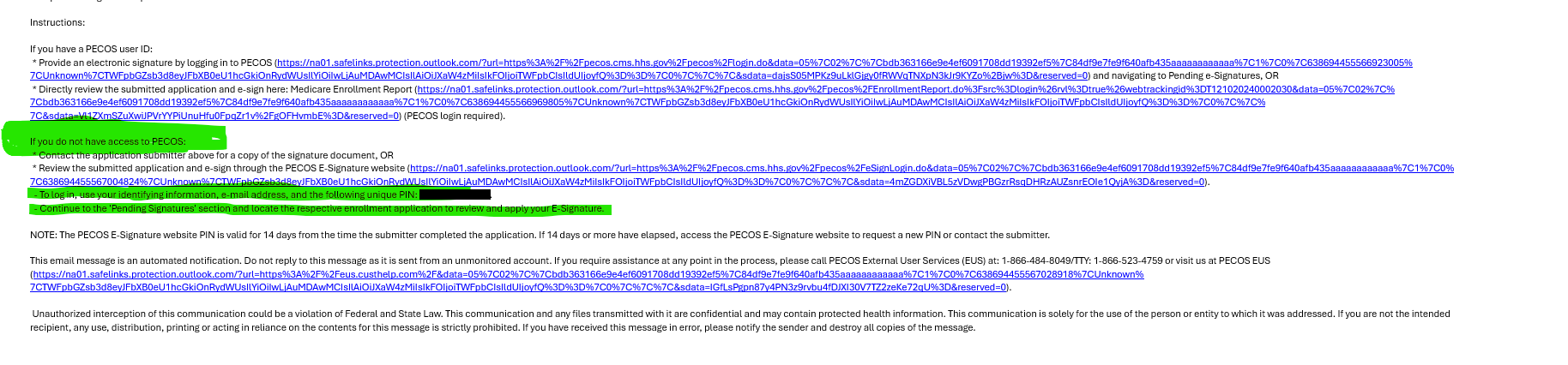
- Enter:
- The provider’s full legal first name exactly as listed in CAQH (e.g., Mary Jane, not Mary)
- The 13-digit PIN from the CMS email
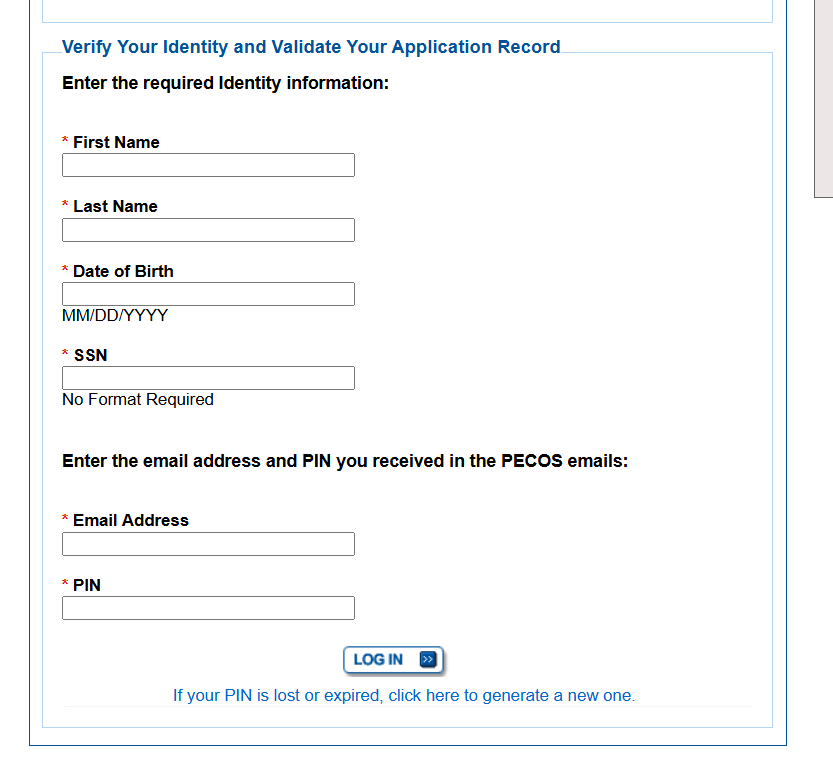
- Apply the e-signature.
After submission
Email credentialing@zayacare.com to confirm completion. The Zaya Credentialing Team will verify your enrollment.
Troubleshooting login issues (if PECOS access is needed)
To reset your CMS I&A password (must be completed by the provider):
- Go to the CMS I&A Login website.
- Click Forgot Password.
- Enter your User ID.
If you cannot answer security questions:
- Try resetting by email.
- If no email access, call the EUS Help Desk.
EUS Help Desk:
1-866-484-8049
TTY: 1-866-523-4759
Have your NPI, PTAN, and date of birth ready.
CAQH Overview
CAQH (Council for Affordable Quality Healthcare) is an online provider data collection platform. It streamlines credentialing using a standardized electronic profile accepted by most health plans, hospitals, and healthcare organizations.
How to create a CAQH profile
If you are new to CAQH:
- CAQH ProView Registration: https://proview.caqh.org/pr/registration
- CAQH ProView Provider User Guide (PDF): https://www.caqh.org/sites/default/files/solutions/proview/guide/provider-user-guide.pdf
You will need to provide your NPI, license details, and practice information. After completing your profile, attest to it so payers can access your data.
How to find your CAQH ID
If you do not know your CAQH ID, use the lookup tool:
https://proview.caqh.org/Login/ForgotCAQHID
Enter your identifying information (such as name and NPI) to retrieve your CAQH ID.
Was this article helpful?
That’s Great!
Thank you for your feedback
Sorry! We couldn't be helpful
Thank you for your feedback
Feedback sent
We appreciate your effort and will try to fix the article