Prior Authorization: How does it work through Zaya?

Modified on Thu, 19 Feb at 2:45 PM

Summary
Zaya Care offers an optional service to handle Prior Authorization (PA) requests. You can use Zaya’s PA service or manage PA on your own.

Regardless of the option you choose, the prior authorization number (Auth #) must be entered on the CMS-1500 claim form before submitting the claim to Zaya.


Using Zaya’s PA service

  1. Log into the Zaya Portal 

  2. Run an eligibility check with benefit verification (see this article for full details)

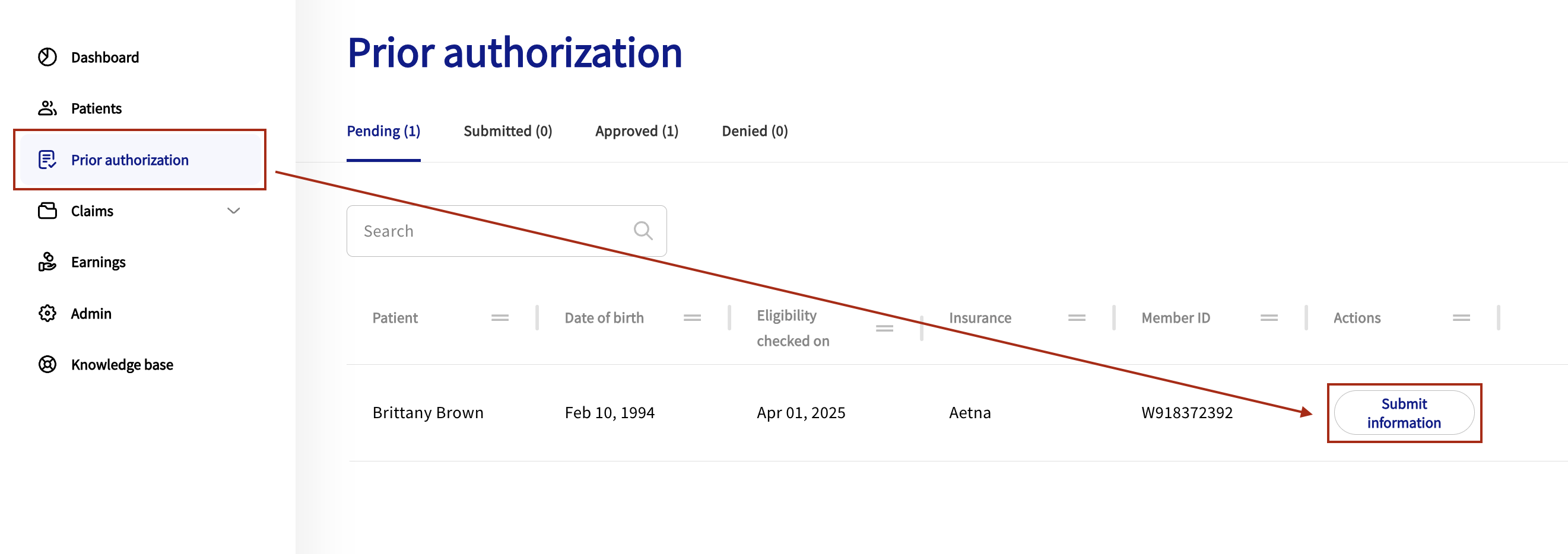
  3. Click the 'Prior Authorization' tab on the left of the screen

  4. If a patient requires prior authorization, their name will appear in the 'Pending' list

  5. Click Submit Information to begin the form.

    • Use the Continue and Back buttons to move through the form.

  6. Complete the Attestation and Completion step.

    • You must attest before submitting the form to Zaya.

Zaya submits the authorization request to the payer within 24–48 business hours.

If additional information is needed, the Support team will contact you by email.


Viewing authorization outcomes

Once the payer responds, the patient will move from Submitted in the Prior Authorization tab to one of the following:

  • Approved – The payer approved the request. You will see the Auth #, approval date, date range, and approved visits or units.

  • Denied – The payer denied the request. You will see the denial date and can review next steps.


Reauthorization

To prevent interruptions in care:

  1. Go to the Approved tab when the current authorization is nearing its end date or when approved visits or units are nearly exhausted.

  2. Submit a new authorization request before expiration to maintain continuous coverage.

Some EMRs automatically track authorization expiration dates. Use these reminders to stay ahead.


Was this article helpful?

That’s Great!

Thank you for your feedback

Sorry! We couldn't be helpful

Thank you for your feedback

Let us know how can we improve this article!

Select at least one of the reasons
CAPTCHA verification is required.

Feedback sent

We appreciate your effort and will try to fix the article